




Switch between New Expensify and Expensify Classic
How to Switch Between New Expensify and Expensify Classic
You can switch between New Expensify and Expensify Classic on web or mobile. However, switching back to Expensify Classic is only available to eligible accounts.
Who can switch between New Expensify and Expensify Classic
You can switch from Expensify Classic to New Expensify. However, switching back to Expensify Classic depends on your account’s eligibility.
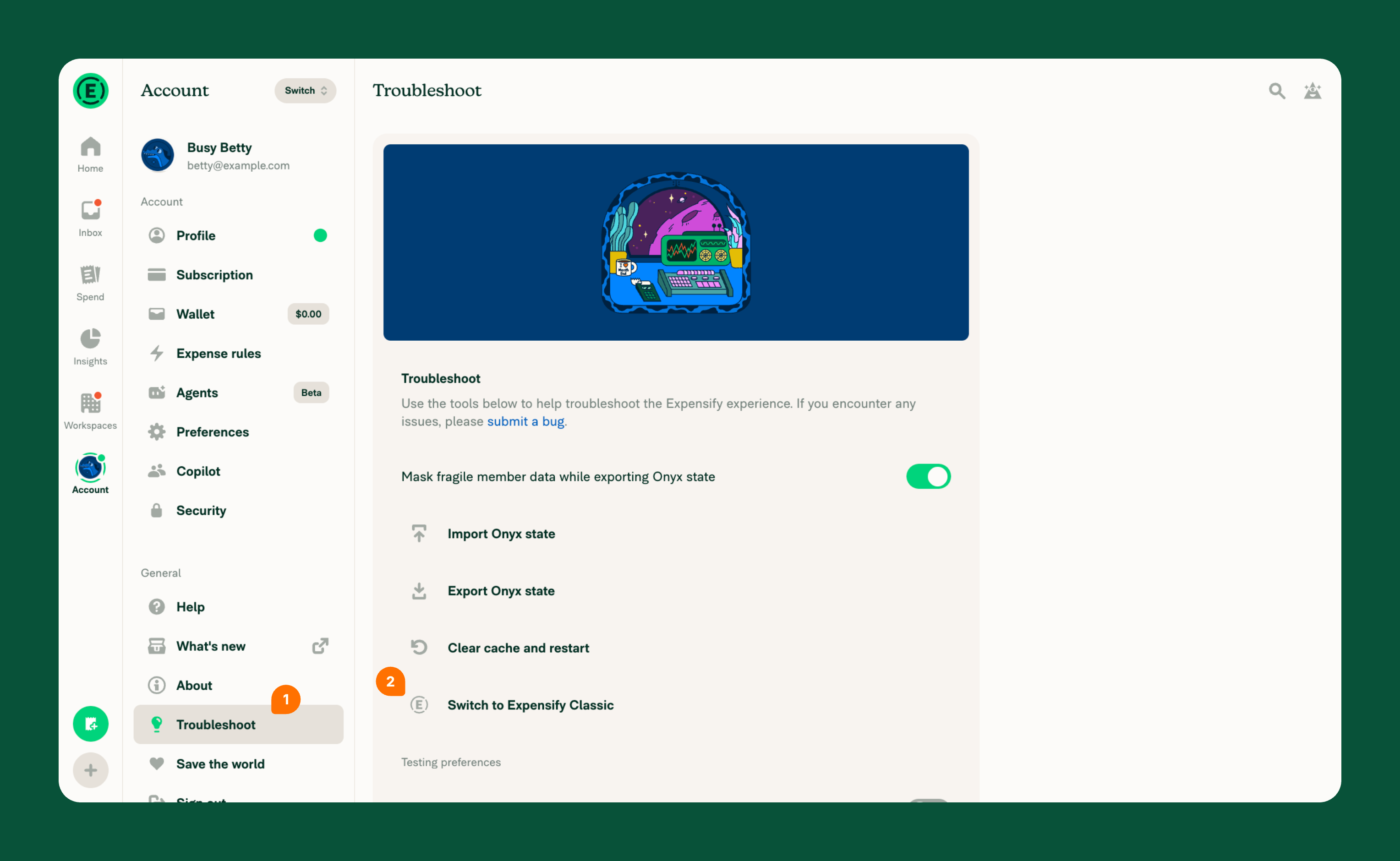
If your account is eligible, you’ll see Switch to Expensify Classic under Troubleshoot. If the option is missing, see why switching may be unavailable.
How to switch from New Expensify to Expensify Classic
On web:
- In the navigation tabs on the left, select Account > Troubleshoot.
- Select Switch to Expensify Classic if it appears.
On mobile:
- Select your profile icon.
- Select Troubleshoot.
- Select Switch to Expensify Classic if it appears.
How to switch from Expensify Classic to New Expensify
You can switch to New Expensify directly by visiting new.expensify.com and logging in to your account.
Alternatively, you can switch from Expensify Classic:
On web:
- Use the navigation tabs on the left.
- Click Try New Expensify.
On mobile:
- Tap the hamburger menu in the top-left corner,
- Tap Try New Expensify.
Why you might not see the option to switch
Switch to Expensify Classic only appears for eligible accounts.
You may not see this option if your account or domain has been migrated to New Expensify.
FAQ
What’s the difference between New Expensify and Expensify Classic?
New Expensify brings expense management, AI-powered workflows, and real-time collaboration together in one place. You can scan receipts, manage expenses, split bills, and collaborate with teammates, with AI helping automate everyday tasks.
Expensify Classic uses the previous Expensify interface and workflows.
What is the difference between Go back just once and Switch to Expensify Classic?
Go back just once temporarily opens Expensify Classic. The next time you visit Expensify, you’ll automatically return to New Expensify.
Switch to Expensify Classic switches you to Expensify Classic for future visits, rather than just once.
Will Expensify Classic be removed?
Expensify continues to improve both experiences, and there are currently no plans to remove Expensify Classic. Members will be notified in advance of any significant product changes.
Can I disable New Expensify for my team?
No. There is currently no option to disable New Expensify for your team.
Why does New Expensify look so different?
New Expensify offers a modern, mobile-friendly experience that brings expense management, AI-powered workflows, and real-time collaboration together in one place. Its updated design makes it easier to manage expenses, payments, and everyday tasks while collaborating with teammates.


